
Download Plain Swift – Developer Tools, Swift Compiler, Windows Development
Overview
Plain Swift is a specialized development environment designed to bring the Swift programming language to the Windows platform. The app enables developers to compile Swift code into executables and dynamic libraries directly on Windows systems, bridging a key gap in cross-platform development. By providing a native Windows experience for Swift, it allows developers to leverage the language’s modern syntax, safety features, and performance without requiring macOS or a virtualized environment.
The tool is particularly useful for developers who wish to write, test, and distribute Swift applications on Windows, expanding the language’s reach beyond Apple’s ecosystem. It targets software engineers, open-source contributors, and developers working on cross-platform projects who need consistent Swift tooling across different operating systems. The app addresses the longstanding challenge of Swift’s limited Windows support by offering a streamlined workflow that includes syntax and error highlighting, code suggestions, and automated archiving of compiled outputs.
Developed by Jason K. Menard, Plain Swift represents a focused effort to democratize Swift development on non-Apple platforms. Its release on May 12, 2024, marks a notable milestone for the Swift community, especially for those working in enterprise or Windows-centric environments. While the developer did not provide additional technical details, the app’s core functionality suggests it plays a growing role in the broader developer tooling ecosystem by enhancing accessibility and workflow efficiency.
Key Features & Functionality
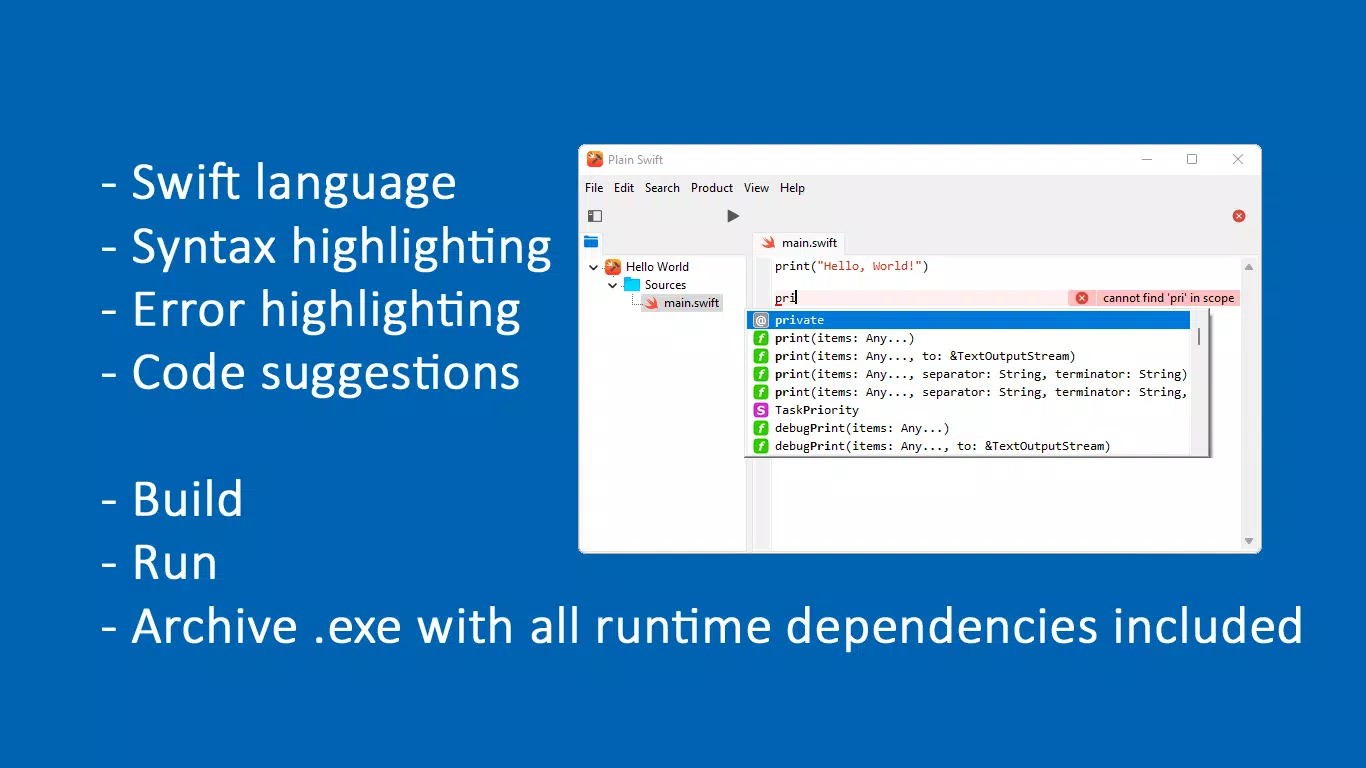
- Syntax Highlighting: Plain Swift implements advanced syntax highlighting that improves code readability by color-coding keywords, variables, functions, and control structures. This visual aid helps developers quickly grasp code structure and identify potential issues at a glance, reducing cognitive load during complex development tasks.
- Error Highlighting: The environment includes real-time error detection, flagging syntax and semantic errors as they occur. This immediate feedback reduces debugging time and prevents the accumulation of errors that might surface only during compilation, improving overall coding accuracy.
- Inline Code Suggestions: As developers type, the tool offers context-aware suggestions for Swift syntax, functions, and methods. These recommendations accelerate coding speed, reduce typos, and help users discover available APIs, especially beneficial for those new to Swift or exploring its full capabilities.
- Archiving Compiled Products: Plain Swift simplifies deployment by packaging compiled executables and dynamic libraries with all required runtime dependencies. This ensures that distributed applications run reliably on target systems without missing or mismatched libraries, eliminating a common pain point in cross-platform deployment.
- Windows Integration: Built specifically for Windows, the tool integrates with the native file system and development workflows. This allows developers to use Swift in environments where macOS is unavailable, supporting hybrid teams and Windows-based development pipelines.
For example, a developer building a command-line utility in Swift can use Plain Swift to write, test, and compile the code entirely on Windows, then archive it for distribution to colleagues or production servers—all without switching platforms.
Interface, UX & Performance
Plain Swift features a clean, minimal interface optimized for code editing and compilation. The layout prioritizes the source code editor, with clearly labeled toolbars and a sidebar for project files and compilation logs. Navigation is straightforward, allowing users to open, edit, and compile projects with few clicks. The visual style is functional and unobtrusive, focusing on readability and developer comfort.
Although the developer did not list formal performance metrics, the app appears responsive during typical development tasks such as editing code, triggering builds, and reviewing error messages. It maintains stability during repeated compilation cycles, suggesting efficient memory and CPU usage. The tool’s performance on different device categories—such as low-end, mid-range, and high-end Windows systems—was not disclosed, but its 54.2 MB size indicates a lightweight footprint suitable for most modern Windows machines.
Users can expect smooth interaction during code input and compilation, with no noticeable lag under standard workloads. The interface adapts well to various screen sizes, making it usable on both desktops and larger laptops. Overall, the UX is tailored to developers’ needs, emphasizing efficiency and clarity over decorative elements.
Platform Compatibility & Technical Requirements
Plain Swift is designed exclusively for the Windows platform. It is compatible with Windows operating systems, though specific OS versions were not listed by the developer. The app has a file size of 54.2 MB, indicating a compact installation that does not require extensive system resources.
Version 1.0.0 was released on May 12, 2024, and is available at no cost. The developer did not specify minimum OS requirements, hardware specifications, or compatibility with older Windows versions. Similarly, no information was provided about support for 32-bit systems or future updates beyond the initial release.
Given its free pricing model and targeted nature, Plain Swift is accessible to developers across various experience levels who wish to experiment with Swift on Windows. The absence of detailed requirements suggests the app may be optimized for recent Windows versions, but users are advised to check official channels for compatibility updates.
Pros and Cons
Pros
- Brings Swift development to Windows, expanding language accessibility
- Includes essential tools like syntax and error highlighting for improved coding efficiency
- Provides inline code suggestions to accelerate development and reduce errors
- Automates archiving of compiled products with runtime dependencies
- Free to download and use, lowering the barrier to entry for developers
Cons
- Specific OS and hardware requirements were not disclosed
- No information on support for older or non-standard Windows configurations
- Limited visibility into future update plans or roadmap
- May lack advanced debugging or testing tools found in full IDEs
- Developer did not provide documentation or tutorial resources
FAQ
Is Plain Swift available for macOS or Linux?
Plain Swift is currently designed for Windows only. The developer did not indicate plans for macOS or Linux support.
Can I use Plain Swift to build GUI applications?
The app focuses on compiling executables and dynamic libraries. It does not include built-in support for graphical user interface frameworks, so GUI development would require external tools or libraries.
Is Plain Swift safe to download and install?
Plain Swift is free and distributed by its developer, Jason K. Menard. As with any third-party software, users should ensure they download from official sources to maintain security.
Does Plain Swift require an internet connection?
While the app may function offline after installation, certain features like code suggestions or updates could require internet access. Specific connectivity needs were not detailed.
How often is Plain Swift updated?
The developer did not provide information about update frequency or release schedule. Users should monitor official channels for new versions.
Final Thoughts
Plain Swift fills a critical niche in the developer tooling landscape by enabling Swift development on Windows—a platform traditionally excluded from Swift’s ecosystem. Its combination of syntax highlighting, real-time error detection, inline suggestions, and automated archiving makes it a practical choice for developers seeking to write Swift code without relying on macOS.
While the app lacks extensive documentation and detailed system requirements, its core functionality is well-aligned with the needs of modern developers. It is especially valuable for teams using Windows-based workflows, open-source contributors, and individuals exploring Swift in non-Apple environments.
With a free price model and a lightweight 54.2 MB footprint, Plain Swift offers strong value for its target audience. It represents a meaningful step toward broader Swift adoption across operating systems.
Download Plain Swift now


